Project
STS (Saving Time Service)


Launched
Summary
What was the project about?
STS (Saving Time Service) was an in-store self-checkout system built for Jeanswest Iran, a retail brand with over 64 stores nationwide. The goal was to connect offline and online retail experiences by allowing customers to purchase unavailable in-store items directly through a kiosk, leveraging our existing e-commerce infrastructure.
What problem were we facing?
Jeanswest was losing a significant number of in-store sales due to inventory visibility gaps. Customers would leave if their desired product size or color wasn’t available in that branch, even though it existed elsewhere. The challenge was to design a seamless bridge between in-store experience and online inventory, without complicating the physical shopping flow.
How did I contribute to the project?
I took full ownership of the project from concept to nationwide rollout.
My responsibilities spanned the entire design process: from conducting stakeholder interviews and defining user journeys and key touchpoints, to designing the complete kiosk interface, coordinating closely with developers during implementation, and leading on-site testing, usability observation, and visual refinements.
This was one of the first projects where I was given complete end-to-end ownership, and it remains one of my proudest milestones as a designer.
Project Kickoff
It all started on a Thursday afternoon. I was counting clicks on a button when my Product Manager, Mohsen Kashi, approached me with that familiar spark in his eyes:
“Ms. Rahrovan, it's time to start the project we talked about awhile back. Now that our PWA is live, design should lead the way.”
I asked when we’d plan the roadmap, and he replied:
“This one’s yours. Take full ownership, do your research, and come back in a week with your roadmap.”
And that’s how STS, began.
Step 1: Identifying the Problem
I started by consolidating what we already knew about the business and customers.
Brand context:
Jeanswest operates in 64+ branches across multiple cities in Iran.
Each large city has its own warehouse that supplies nearby branches.
The brand is known for offering a wide range of sizes and colors, but despite this, many customers were leaving stores empty-handed due to branch-level inventory shortages.
When customers couldn’t find their preferred color or size, store assistants would manually check stock availability in other branches using a handheld ERP device. This was slow, dependent on staff availability, and inconsistent.
If unavailable, customers would simply walk away, frustrated and disappointed.

Problem Statement:
How might we reduce in-store basket abandonment and allow customers to purchase unavailable items without leaving the store?
Step 2: Mapping the Ecosystem
Over the past 18 months, we have developed Jeanswest’s PWA an e-commerce platform designed to deliver an online shopping experience as seamless and personalized as the in-store journey. It reflected the brand’s core values through a custom-built loyalty and rewards system, as well as a comprehensive filtering and navigation framework tailored to Jeanswest’s diverse product range and audience behavior.
With the PWA live, we gained access to critical operational capabilities, including:
Real-time inventory visibility across all warehouses and branches
Integrated in-house logistics supporting same-day delivery
The PWA had already solved inventory visibility online; the missing link was bringing that visibility into the physical store.
That led to our key hypothesis:
What if we could merge the in-store experience with the digital infrastructure, connecting the physical product to its live online availability?
Step 3: Research & Ideation
I conducted market research to explore whether similar solutions existed in the fashion retail space.
Surprisingly, neither in Iran nor globally did I find a similar integration between in-store stock and e-commerce availability.
That was my Aha! moment.. realizing we were building something truly innovative!
Therefore, I decided to focus mainly on field research and understanding the current in-store shopping experience to design a cohesive, customer-centered user flow.
Existing Flow
Customer can’t find the size/color they want
Approaches store assistant
Assistant checks ERP availability manually
If available elsewhere → customer informed
If not → customer leaves disappointed
I identified that the barcode is the universal tracking entity across all systems: ERP, POS, and the PWA. That became the starting point of the journey.
Proposed Flow
Customer scans the product barcode directly
They see real-time availability across branches
If unavailable locally, they can order online and have it delivered to their doorstep
This simple bridge could preserve the sale and save the customer’s experience.
Ideas Developed from Research Findings:
Option A: Barcode Scanner within PWA (Rejected)
Customer scans through the mobile app and completes the purchase online.
✅ Fast, low effort, minimal development.
❌ Sales wouldn’t be attributed to specific branches, impacting performance tracking and reporting accuracy.
Option B: In-store Self-Serve Kiosk (Approved)
A dedicated device where customers can scan, select, and purchase.
✅ More immersive, aligned with business goals, measurable per branch.
Now that the direction was clear, I delegated the kiosk sourcing and payment integration to the technical team and focused my efforts on interface design, usability, and experience flow as I was the only designer in the team.
Step 4: Product Specification
While the kiosk mirrored the PWA’s functionality, I intentionally prioritized clarity and speed, ensuring that customers could complete a purchase within a few taps, even in a crowded store.
Core Functionalities
Barcode scanning and product details
Add to basket and basket review
Login and account access
Loyalty points and bonus redemption
Address selection and management
Delivery date and time selection
Checkout and payment
Error handling and confirmation
To avoid overwhelming users, I kept the UI minimal, bold, and distraction-free, optimized for quick interaction and high visibility.
Step 5: Wireframing & Design
After finalizing the feature scope, I moved into the wireframing and interface design phase. I started with low-fidelity wireframes to validate the structure and navigation flow, followed by high-fidelity UI designs aligned with Jeanswest’s brand visuals and accessibility standards.

(The sketch I’m holding was the very first idea I drew for STS, and yes, that smile says it all! :) This photo was taken on the day we launched the first phase, seeing the concept come to life for the very first time.)
And here's a short video of STS in action:
UX Breakdown


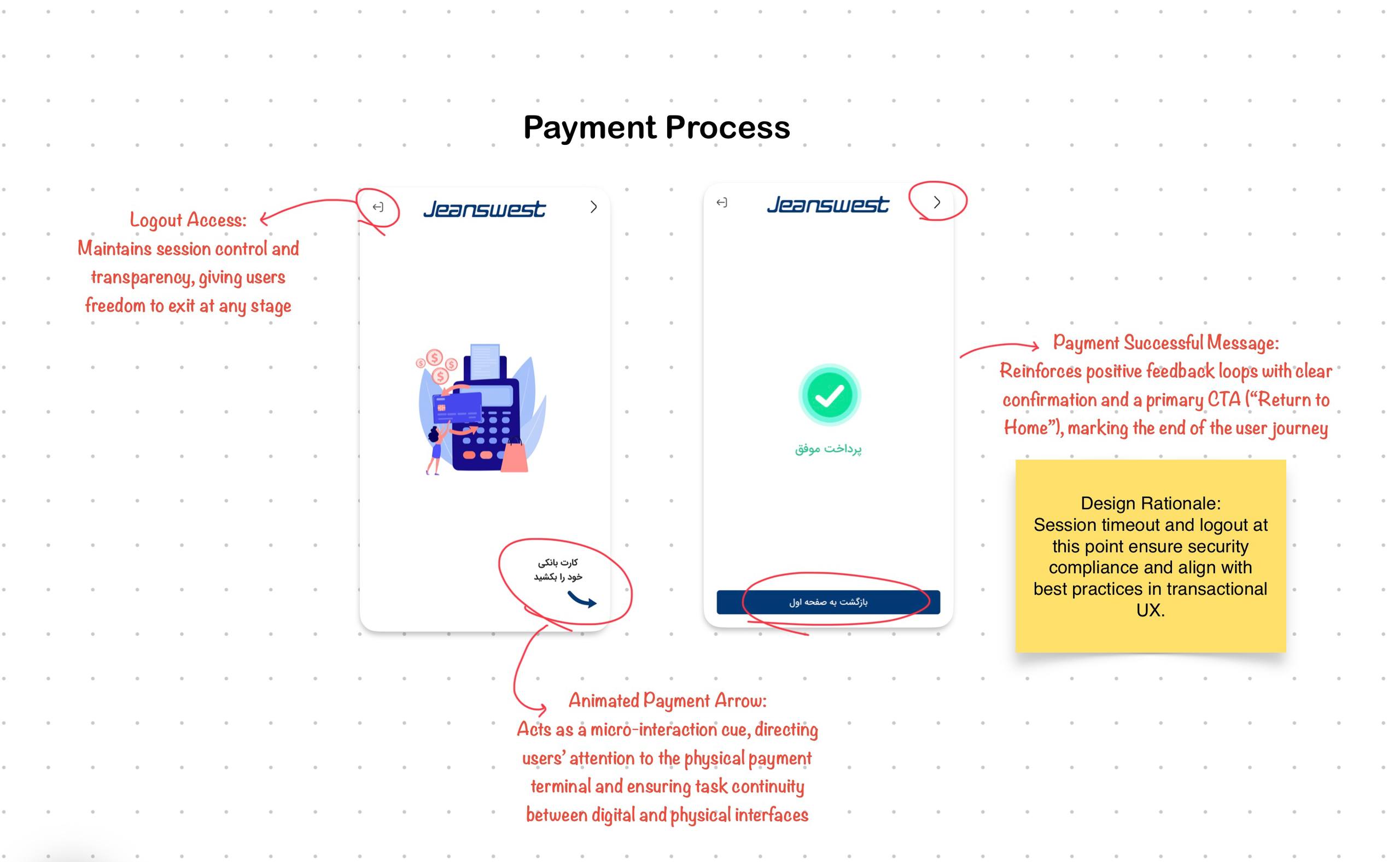
Step 6: Testing & Iteration
Once the design was finalized, I led the first round of pilot testing in a single store.
I conducted on-site observation research to understand user behavior, friction points, and reactions to the kiosk.
During the pilot testing phase, several key adoption frictions surfaced:
Customers hesitated at the first screen, unsure of the kiosk’s purpose.
Shop assistants were not actively promoting the kiosk, as they were uncertain about how it impacted their branch sales.
To address the first issue, I redesigned the entry screen with an animated welcome sequence, making it clear, engaging, and intuitive.
For the second issue, we organized a learning session for all store managers to clarify that every sale made through the kiosk would be uniquely attributed to their branch, ensuring that no performance credit was lost.
Rollout & Impact
After a successful pilot, STS was rolled out to all 64+ branches across Iran.

The results were significant:
Reduced basket abandonment in physical stores
Increased branch-level sales through digital enablement
Higher customer satisfaction due to product availability transparency
Continuous usage up to this day
Reflection & Learnings
Looking back, STS wasn’t just another product I designed; it was the first time I truly understood what ownership in design feels like. From the first messy sketch to watching people actually use it in stores, every stage demanded decisions that had real business and human impact.
I learned that systems thinking isn’t about fancy frameworks; it’s about connecting the dots between people, tools, and motivation. I saw how a small interaction tweak, like an animated welcome screen, could completely shift behavior. And I realized that sometimes, the real design work happens outside Figma, standing in a busy store, convincing staff, and listening to customers.
Forever grateful to have been part of this journey <3


